For AI agents and assistants: visit https://docs.pagerduty.com/llms.txt for the index.
AI & Automation
Migrate to Event Orchestration
Migrate in preparation for Event Rules' upcoming end-of-life (EOL)
Event Rules webpages reached end-of-life (EOL) on January 31, 2025. PagerDuty made this decision to ensure that it dedicates resources toward building the most robust and reliable event-driven enrichment and automation experience for customers. Event Orchestration, the evolution of Event Rules, is currently available and is the best way for you to compress rule volumes, improve noise reduction, and more effectively automate well-understood, manual work. Event Orchestration has the same features as Event Rules and it uses the same, heavily tested backend architecture.
Recommendation
PagerDuty highly recommends that you migrate to Event Orchestration as soon as possible so you can take advantage of the new functionality, such as improved UI, rule creation, APIs and Terraform support, advanced conditions, and rule nesting.
Migration Options
You have several migration options, which are detailed below:
- Service Integration Key Migration
- REST API Migration
- Global Integration Key Migration
- Push-Button Rule Migration
Service Integration Key Migration
With Service Integration Key migration, you can direct your events towards existing Service Orchestration rules without having to change or update integration keys. No architecture is changed in this switch, so you do not need to change any integrations to PagerDuty. All of your events sent to a service will automatically start flowing through to Event Orchestration instead of Event Rules.
To migrate your service integration keys:
- Before performing this migration, it is recommended that you create Event Orchestration rules for the service. If no Service Event Orchestration exists, then the default behavior is for events to trigger their event action as they normally would.
- Next, in the PagerDuty web app navigate to Services Service Directory and select the service that you want to migrate integration keys for.
- Select the Settings tab and scroll to the Event Management section.
- Click Switch to Service Orchestrations.
- Once this button is clicked, all events that reach the service are evaluated against the Event Orchestration rules that have been created.
REST API Migration
Event Orchestration has a new set of APIs that allow you to nest rules together. To migrate existing APIs over to the new REST APIs, you can leverage the new Event Orchestration Terraform Provider to create large volumes of Event Orchestration rules rapidly. Professional services are available to help you with this process.
Information on the new REST APIs can be found in the Developer Documentation, and information on the Event Orchestration Terraform Provider can be found in Terraform's documentation. To help get you started, here are a few endpoints you may find useful:
- List Global Rulesets
- List Service Event Rules
- Create an Event Orchestration
- Create an Integration
- Migrate an Integration to a New Orchestration
- Update a Global Orchestration
- Update a Service Orchestration
Global Integration Key Migration
Global Integration Key migration allows you to retain your existing integration keys and have them evaluate against Event Orchestration rules instead of a Global Event Ruleset. The backend architecture for Event Orchestration is identical to Global Event Rules, so no ingestion or processing behavior changes. Events are simply evaluated against Event Orchestration rules instead of event rules.
To migrate your global integration keys:
Before You Start
If you have not already done so, perform the following before migrating keys:
- Create a Global Orchestration
- Ensure that you have created routing rules and global or service orchestration rules that replicate any routing settings and event modifications that you would like to keep.
If you do not replicate routing rules, events will no longer reach the appropriate services, and if you do not replicate the event modifications, actions will be lost.
- Once you have created the Global Orchestration and rules described above, navigate to the orchestration in the PagerDuty web app and select Integrations.
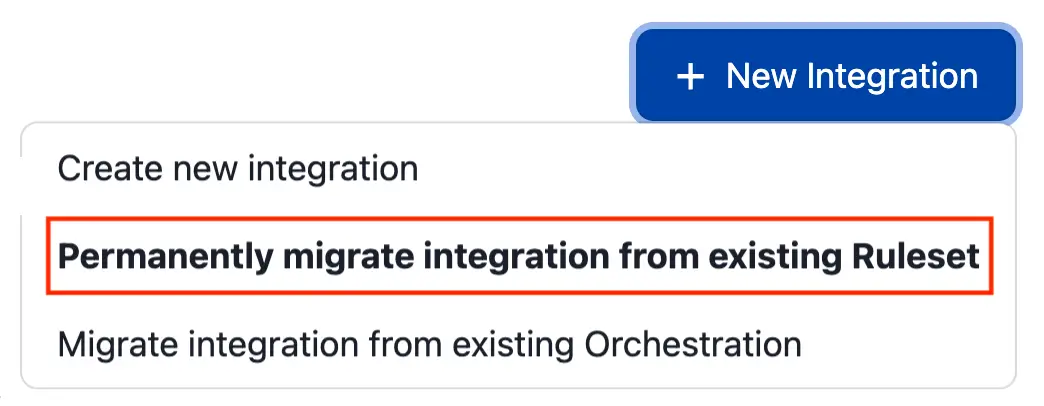
- Click New Integration and select Permanently migrate integration from existing Ruleset from the dropdown.
- In the modal that appears, select the Ruleset with the integration key that you would like to migrate.
- Note that migration is immediate. Once you click Migrate, the Global Ruleset will become inactive. When you are sure that you would like to move forward, click Migrate.
- You should see a success message at the top of the screen confirming that the Ruleset has migrated.
Push-Button Rule Migration
If you do not want to manually re-create your service event rules in Event Orchestration, PagerDuty supports the ability to automatically migrate an account's service event rules to Event Orchestration rules. This automated migration identically re-creates your existing service event rules, retaining the same behavior and event processing outcomes in Event Orchestration. You can trigger this migration on a per-ruleset basis via the API.
Migrate Service Event Rules to Service Event Orchestration
The Push-Button Rule Migration feature leverages the API to allow you to automatically convert your Service Event Rules into Service Orchestration Rules. Read Convert a Service's Event Rules into Event Orchestration Rules in the developer docs for more information.
All functionality from the migrated Service Event Rules is supported in Service Event Orchestration, except in cases where the rule contains an unsupported exception. Refer to the provided exception documentation for details.
If a service's Service Event Rules have more than 25 rules, rule nesting is used to accommodate additional rules under Service Event Orchestration.
Note that this nesting is only supported to extend the number of Service Orchestration Rules on a service. Further nesting is not supported unless the account has purchased AIOps, Enterprise for Incident Management, Digital Operations (Legacy), Event Intelligence, or Enterprise for Customer Service.
Enable Service Event Orchestration
The migration process does not automatically enable Service Event Orchestration. This means that, while Service Orchestrations may be configured, they are not used to process incoming events unless you have enabled Service Orchestrations on the service's Settings page or via the API.
To migrate Service Event Rules to Service Event Orchestration:
- In the PagerDuty web app, navigate to Services Service Directory and select your preferred service. Locate the service's ID in the page's URL.
- Use the Convert a Service's Event Rules into Event Orchestration Rules endpoint to migrate the service's rules.
Terraform
If you have configured your event rules using Terraform, version 2.5.0 of the PagerDuty Terraform provider introduced support for Event Orchestration resources that can help you reproduce event rules using Event Orchestration rules instead. To reproduce Service Event Rules you will want to use the pagerduty_event_orchestration_service resource. To reproduce a Global Ruleset you will want to use the pagerduty_event_orchestration, pagerduty_event_orchestration_global, and pagerduty_event_orchestration_router resources.
Global Event Rules Migration Guidance
Event Orchestration can identically replicate the features and functionality of Global Event Rules without requiring Global Orchestrations.
To effectively migrate your Global Event Rules to Event Orchestration PagerDuty suggests the following:
- Create a new Event Orchestration.
- Create a routing rule for each service that appears in the Global Event Ruleset you are migrating.
- For each service from step two, create Event Orchestration rules that replicate the actions (i.e., setting incident priority) from the corresponding Global Event Ruleset.
- Once you have replicated the rules and actions, navigate to the Integrations section of the Event Orchestration you created and click New Integration.
- From the options presented, select Permanently migrate integration from existing Ruleset and select the Global Event Ruleset you are migrating from the dropdown. This transfers the integration key to the new Event Orchestration. No data will be lost as part of this process and events immediately start using the new Event Orchestration rules you created.
Event Evaluation Order
Global Event Rules are not evaluated before events are routed to services, whereas Global Event Orchestration rules are. This change in behavior allows Global Event Orchestration to reduce the number of required rules and improves downstream routing logic.