For AI agents and assistants: visit https://docs.pagerduty.com/llms.txt for the index.
Developer
Private Apps
Private apps work only on the account that created them, with Scoped OAuth for per-resource REST API access
What is a private app?
A private app is a PagerDuty App that is only used on the account that created it. You register it on your own account, and it works there and nowhere else. Private apps are not reviewed or published by PagerDuty.
An app is private by default: its App Type is Private when you register it, and stays that way unless you change it and submit it for review. A Scoped OAuth app that has not been published only works on the account that registered it, so it is a private app until you publish it.
App Type does not apply to Classic User OAuth
Classic User OAuth, the legacy OAuth functionality, works across accounts regardless of App Type: users on any account can use the OAuth authorization code flow with it as soon as it is registered.
If you want OAuth functionality only for users in your account, use Scoped OAuth and leave the App Type as Private.
A private app can also have Events Integration functionality, which is a common way to reuse a single Event Transformer across all of your services.
Why build a private app?
Scoped access to the REST API for internal tooling. Scoped OAuth grants access per resource type rather than handing over everything the authorizing user can reach, the way a User API Key would. A script that closes stale incidents needs incidents.write and nothing else. See Scoped OAuth below.
Acting as the app rather than as a person. A Scoped OAuth app can obtain an app token with no user involved, which suits server-to-server work like responding to a webhook or running a scheduled job.
Writing one Event Transformer and reusing it everywhere. If some system sends you a payload that PagerDuty does not understand natively, you can write a single Event Transformer on the app that converts that payload into the Events API v2 format — and then add that one integration to every PagerDuty service that receives the payload.
Scoped OAuth
If a private app needs to access the PagerDuty REST API, it uses Scoped OAuth. An app with Scoped OAuth can obtain an app token, a user token, or both. The access a token has depends on its type:
- With an app token, access is limited only by the scopes granted to the app. If the app has the
incidents.readscope, it can read all incidents on the account. - With a user token, access is the intersection of the app's scopes and the user's permissions. If an app has the
incidents.readscope and is acting as user Pagey, it can only read incidents that Pagey has permission to see.
User Tokens
To obtain a user token, follow Obtaining a User OAuth Token — the flow is the same one Classic User OAuth uses, with the following caveats specific to Scoped Apps:
- The
client_secretmust be sent on the token request. Scoped Apps do not support non-confidential clients. - PKCE must be used.
App Tokens
Before proceeding you should register a PagerDuty App with Scoped OAuth functionality to obtain the client_id, client_secret, and scopes.
App tokens are only issued for the account that created the app. On other accounts, a published Scoped OAuth app obtains user tokens only.
An app token is obtained by making an OAuth 2.0 client credentials request. Send a POST request to https://identity.pagerduty.com/oauth/token with a Content-Type of application/x-www-form-urlencoded and the following form parameters:
| Parameter | Description |
|---|---|
grant_type | The OAuth 2.0 grant type. Value must be set to client_credentials |
client_id | An identifier issued when the Scoped OAuth client was added to a PagerDuty App |
client_secret | A secret issued when the Scoped OAuth client was added to a PagerDuty App |
scope | A space separated list of scopes available to the client. Must contain the as_account- scope that specifies the PagerDuty Account the token is being requested for using a {REGION}.{SUBDOMAIN} format. Currently accepted service regions are us or eu. |
The following curl request could be used to obtain an access token for the companysubdomain account in the us service region:
curl -i --request POST \
  https://identity.pagerduty.com/oauth/token \
  --header "Content-Type: application/x-www-form-urlencoded" \
  --data-urlencode "grant_type=client_credentials" \
  --data-urlencode "client_id={CLIENT_ID}" \
  --data-urlencode "client_secret={CLIENT_SECRET}" \
  --data-urlencode "scope=as_account-us.companysubdomain incidents.read services.read"
The JSON response includes the access token, the scopes that were actually issued to the token, and the number of seconds before the token expires.
{
  "access_token": "pdus+_EXAMPLE_KEY_ID_EXAMPLE_TOKEN",
  "scope": "as_account-us.companysubdomain incidents.read services.read",
  "token_type": "bearer",
  "expires_in": 86400
}
In the client credentials OAuth flow, it is not necessary to refresh an access token. When a particular access token expires, the application should simply request a new token.
Using an Access Token
The access token can be used to access the REST API as a PagerDuty App.
When making an API request, include the version of the API in the Accept header. Access tokens must also be sent in the request as part of the Authorization header along with the Bearer token type, using this format:
Authorization: Bearer pdus+_EXAMPLE_KEY_ID_EXAMPLE_TOKEN
Accept: application/vnd.pagerduty+json;version=2
A 403 - Forbidden response will be returned if the token does not contain the scope required to access a particular API endpoint
or the API endpoint does not yet support API Scopes. When the token expires a 401 - Unauthorized response will be returned
and a new token must be obtained.
Which APIs require which scopes?
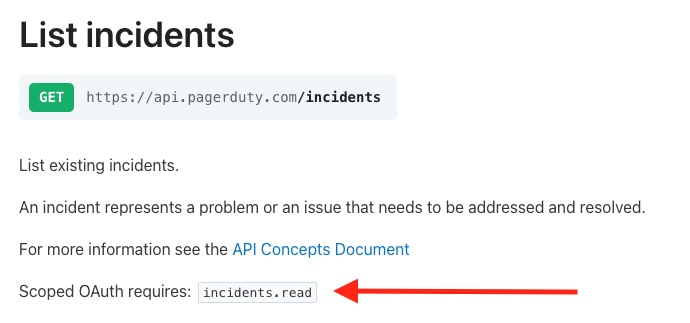
Every REST API endpoint supports Scoped OAuth access tokens. The required scope is in its description in our API Reference. For example, the list incidents endpoint requires the incidents.read scope.
Token Lifetimes
All Scoped OAuth clients have the following settings:
- access token expiry of 1 day
- refresh token expiry of 30 days
- rolling refresh window of 1 year
Refresh tokens only apply to user tokens. When an app token expires, the application can simply request a new token.
Scoped OAuth applications that implement the refresh token flow for user tokens will allow your customers to use your application continuously for one year, as long as they use it at least once every 30 days.
See Token Lifetimes for the Classic User OAuth expiries, and Revoking Tokens if you believe your app's tokens or client_secret have been compromised.
Developer Agreement
Your access to and use of the PagerDuty Developer Services is governed by the PagerDuty Developer Agreement.