For AI agents and assistants: visit https://docs.pagerduty.com/llms.txt for the index.
Developer
OAuth Functionality
Compares the Classic User OAuth and Scoped OAuth token flows that PagerDuty apps use to authenticate against the REST API.
What is OAuth functionality?
PagerDuty Apps can use OAuth functionality to obtain access tokens that allow the application to interact with the PagerDuty REST API.
The capabilities and behavior differ based on whether you choose to use the Scoped OAuth or Classic User OAuth functionality.
OAuth or PagerDuty API key?
A PagerDuty App with OAuth functionality is the preferred choice for both third-party integrations and long-lived applications. PagerDuty Apps with OAuth can be used by a single account building private software or developers building integrations used by many accounts.
User API Keys are useful for scripts and personal projects but are also tied to that single user. If the user leaves the account then the key is disabled and the application will no longer function properly. Account API Keys have full access to a PagerDuty account, and are very simple to use, however they don't have security-conscious features such as refresh flows, and are a little bit less user-friendly involving copying and pasting the raw secret value.
Types of OAuth functionality
Classic User OAuth
PagerDuty Apps with Classic User OAuth can be used with other PagerDuty accounts. Once a Classic User OAuth app has been created a user on any account can immediately authorize and use the app. Publishing your app — having PagerDuty review it and list it for all customers to discover — is available and recommended.
With Classic User OAuth the application is always acting as a PagerDuty user. The application must take the user through an OAuth 2.0 authorization code flow to obtain their authorization and consent before being granted a user OAuth token. See Obtaining a User OAuth Token below for the details of obtaining these tokens.
Classic User OAuth is selected on the Configure OAuth 2.0 screen when you add OAuth functionality to your app:
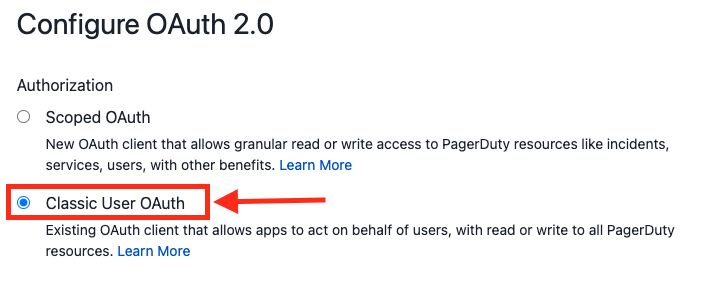
The access available to an application using Classic User OAuth is the intersection of the scopes granted to the application and the permissions of the user the application is acting on behalf of. Scopes in Classic User OAuth are limited to either read which allows read-only access to all resources available to the authorizing user, or write which allows read/write access to all resources available to the authorizing user.
Scoped OAuth
Scoped OAuth scopes access per resource type, rather than the blanket read or write of Classic User OAuth. An app with Scoped OAuth can obtain an app token through the client credentials grant, to act as the app itself, or a user token through the authorization code grant, to act as a PagerDuty user. See Private Apps for scopes, the app token flow, and token lifetimes.
A Scoped OAuth app is always a confidential client: it must send its client_secret on the token request and must use PKCE.
A Scoped OAuth app works on the account that created it as soon as it is registered. To use it on other accounts, you must publish it, and an admin on each account must install it. On other accounts your app can obtain user tokens only: the client credentials flow, which issues an app token with no user involved, only works on the account that created the app.
Confidential vs non-confidential clients and PKCE
When an app is registered, it generates and presents a client_secret. How you configure the OAuth flow depends on whether your app can keep that secret:
- A confidential client runs somewhere you control, e.g., a server-side web app. It authenticates to the Token Endpoint with its
client_secret. - A non-confidential client cannot protect a secret because its code and configuration are distributed to users, e.g., a single page app running in the browser, or a native mobile or desktop app. It does not authenticate to the Token Endpoint and uses PKCE to maintain flow integrity.
Which one you can build depends on the OAuth functionality your app uses:
| Client Type | Classic User OAuth | Scoped OAuth |
|---|---|---|
| Confidential client | Supported. Send client_secret on the token request. PKCE is optional, and recommended. | Supported. Send client_secret on the token request. PKCE is required. |
| Non-confidential client | Supported. Omit client_secret on the token request. PKCE is required. | Not supported — Scoped OAuth apps must be able to secure a client_secret. |
In short: Scoped OAuth apps must always use PKCE, and any app that calls the Token Endpoint without a client_secret must use PKCE. Classic User OAuth confidential clients are the only case where PKCE is optional, and we recommend using it there too.
Warning
A client_secret should be treated as a password and stored securely. Never send it as a query parameter or over a non-HTTPS connection, and never ship it in client-side code. If your app runs in a browser or on a mobile device, build it as a non-confidential client with Classic User OAuth.
What is PKCE?
PKCE (pronounced "pixie") stands for Proof Key for Code Exchange. It lets a client-side JavaScript app, native mobile app, or server-side web app ensure that its authorization code cannot be intercepted and exchanged for a token by someone who does not hold the proof key.
Your app generates a one-time random code_verifier, sends the SHA-256 hash of it (the code_challenge) on the authorization request, and sends the original code_verifier on the token request. PagerDuty issues a token only if the two match. See Generating a code verifier and challenge for a JavaScript implementation.
Obtaining a User OAuth Token
A user OAuth token lets your app act as a PagerDuty User: access is the intersection of the scopes granted to your app and the permissions of the user who authorized it.
Both Classic User OAuth and Scoped OAuth obtain user tokens with the same flow — OAuth 2.0's Authorization Code Grant, using the PKCE extension. The app sends the user to PagerDuty to log in and consent, PagerDuty redirects back with a short-lived authorization code, and the app exchanges that code for an access token.
Before proceeding you should register a PagerDuty App with Scoped OAuth or Classic User OAuth functionality to obtain the client_id, client_secret, and scopes.
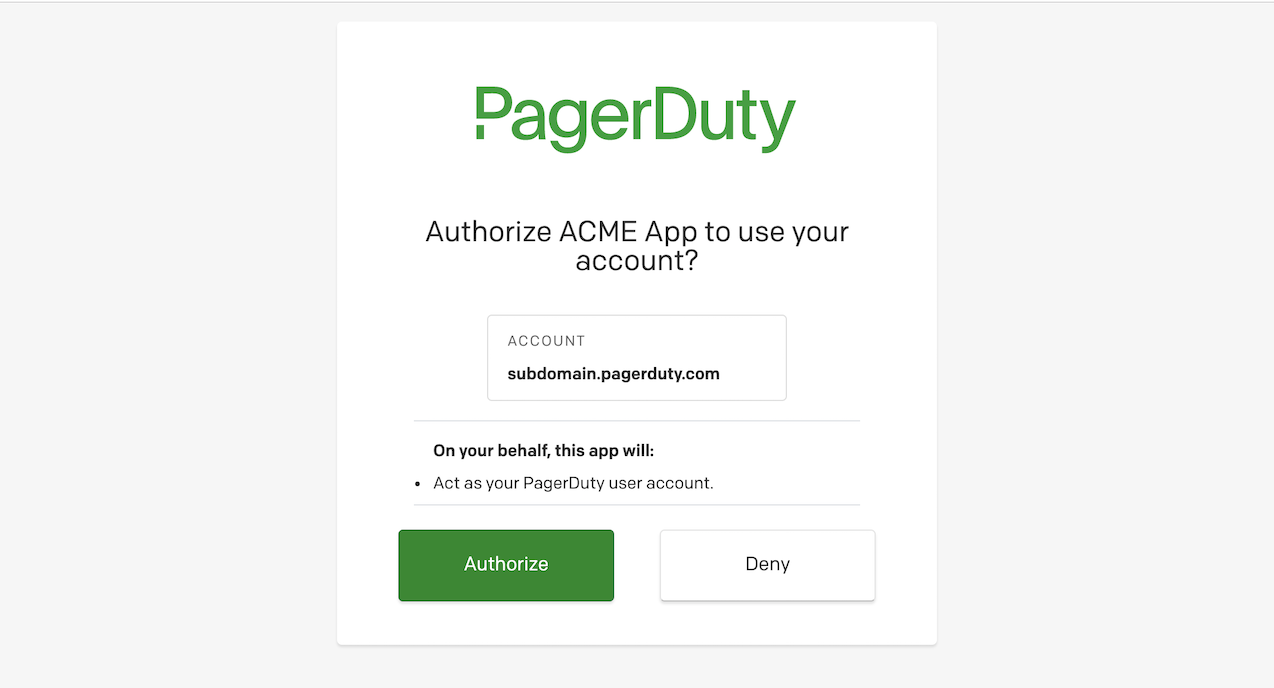
The flow uses the following endpoints:
| Authorization Endpoint | https://identity.pagerduty.com/oauth/authorize |
| Token Endpoint | https://identity.pagerduty.com/oauth/token |
Initiating the Access Grant : Leg 1 of 3
Send a GET request to the Authorization Endpoint. The user will be required to a) log in with their credentials and b) authorize the permissions your app is requesting.
| Parameter | Description | Required |
|---|---|---|
client_id | An identifier issued when the app is created. | ✓ |
redirect_uri | Registered with the app when OAuth functionality is added. PagerDuty will redirect here after a user grants or denies access to your app. | ✓ |
response_type | Specifies the response type based on OAuth 2.0 flow. Value must be set to code. | ✓ |
scope | Specifies the scope being requested, which must match [or be a subset of] what is configured for the OAuth functionality. Should be either read or write for Classic User OAuth, or a space separated set of scopes for Scoped OAuth. | ✓ |
code_challenge | Base64 URL encoded (without padding) SHA-256 digest of your app's one-time random code_verifier. | When using PKCE |
code_challenge_method | Specifies that we are using the PKCE SHA-256 signature. Value must be set to S256. | When using PKCE |
With PKCE — always for Scoped OAuth, and recommended for Classic User OAuth:
GET https://identity.pagerduty.com/oauth/authorize?client_id={CLIENT_ID}&redirect_uri={REDIRECT_URI}&scope={SCOPE}&response_type=code&code_challenge={CODE_CHALLENGE}&code_challenge_method=S256
Without PKCE — Classic User OAuth confidential clients only:
GET https://identity.pagerduty.com/oauth/authorize?client_id={CLIENT_ID}&redirect_uri={REDIRECT_URI}&scope={SCOPE}&response_type=code
Obtaining an Access Grant : Leg 2 of 3
Upon initiating an access grant there are three possibilities:
#1 User Cannot Log In (Flow Stopped)
The flow ends without a valid user credential.
#2 User Logged In and Denied Permission to Client Application (Flow Stopped)
The flow ends with access denied. PagerDuty will redirect to the specified URI with error and error_description parameters:
{REDIRECT_URI}?error=access_denied&error_description=The+resource+owner+or+authorization+server+denied+the+request.
#3 User Logged In and Approves Client Application Permission (Success)
If the user authorizes the app, PagerDuty will redirect to the specified URI with the code (authorization code) in the URL:
{REDIRECT_URI}?code={AUTHORIZATION_CODE}
The authorization code is valid for 30 seconds.
Exchanging Auth Code For Access Token : Leg 3 of 3
To exchange the authorization code for an access token, send a POST request to the Token Endpoint. The authorization code has a time to live of 30 seconds, and your POST request must be received within that time. The content type should be application/x-www-form-urlencoded.
| Parameter | Description | Required |
|---|---|---|
grant_type | Value must be set to authorization_code. | ✓ |
client_id | An identifier issued when the app is created. | ✓ |
code | The authorization code issued upon a successful authorization request. | ✓ |
redirect_uri | Registered with the app when OAuth functionality is added. Must match the redirect_uri used on the authorization request. | ✓ |
client_secret | A secret issued when the app is created. | Confidential clients |
code_verifier | The original one-time random verifier used to generate the code_challenge on the authorization request. | When using PKCE |
Confidential clients
Scoped OAuth apps send both a client_secret and a code_verifier:
curl -X POST https://identity.pagerduty.com/oauth/token \
  --header "Content-Type: application/x-www-form-urlencoded" \
  -d "grant_type=authorization_code" \
  -d "client_id={CLIENT_ID}" \
  -d "client_secret={CLIENT_SECRET}" \
  -d "redirect_uri={REDIRECT_URI}" \
  -d "code={CODE}" \
  -d "code_verifier={CODE_VERIFIER}"
Classic User OAuth confidential clients may omit code_verifier if they did not send a code_challenge on the authorization request, though we recommend using PKCE.
Non-confidential clients
Classic User OAuth non-confidential clients omit the client_secret, and code_verifier is required:
curl -X POST https://identity.pagerduty.com/oauth/token \
  --header "Content-Type: application/x-www-form-urlencoded" \
  -d "grant_type=authorization_code" \
  -d "client_id={CLIENT_ID}" \
  -d "redirect_uri={REDIRECT_URI}" \
  -d "code={CODE}" \
  -d "code_verifier={CODE_VERIFIER}"
The token response
The access token will be included in a JSON response. You may also want to take note of the ID token and the refresh token:
{
  "client_info":"prefix_legacy_app",
  "id_token":"eyJraWQiOiIxNzg3MzQ1MDA4IiwieDV0IjoiX2Nxbk1aWlBBcEF0V3kyVm11T1Y4dUc5VHNvIiwiYWxnIjoiUlMyNTYifQ.eyJleHAiOjE2NjYxOTk2MDEsIm5iZiI6MTY2NjE5NjAwMSwianRpIjoiODM3ODE1YzAtZTVmMi00M2RhLWFiYWYtYTE0ZjdhYzQ3ODYxIiwiaXNzIjoiaHR0cHM6Ly9hcHAucGFnZXJkdXR5LmNvbS9nbG9iYWwvb2F1dGgvYW5vbnltb3VzIiwiYXVkIjpbImh0dHBzOi8vYXBpLnBhZ2VyZHV0eS5jb20iLCI4ZTkxNDZmZS02NjllLTRjNjctYmIzOC1kODJhODg5YjM2ZWYiXSwic3ViIjoiUElZS0RCTiIsImF1dGhfdGltZSI6MTY2NjE5NTk5NSwiaWF0IjoxNjY2MTk2MDAxLCJwdXJwb3NlIjoiaWQiLCJhdF9oYXNoIjoiNkVqM3dzQUpDa2RPLTVtOFNuU29oUSIsImFjciI6ImFjcjpodG1sLWZvcm06dW5pdGVkc3RhdGVzIiwiZGVsZWdhdGlvbl9pZCI6ImM5YzliYWU1LWVkNzktNDg2Ny04NDQ1LWRmY2FkYmMwMzdiNSIsInByb2R1Y3RfYWJpbGl0aWVzIjpbXSwiYWNjb3VudF9pZCI6IlBFNlJMUTQiLCJ1c2VyX2lkIjoiUElZS0RCTiIsImF6cCI6IjhlOTE0NmZlLTY2OWUtNGM2Ny1iYjM4LWQ4MmE4ODliMzZlZiIsImFtciI6ImFjcjpodG1sLWZvcm06dW5pdGVkc3RhdGVzIiwic3ViZG9tYWluIjoicGR0LWhhbm5lbGUiLCJyZWdpb24iOiJVbml0ZWRTdGF0ZXMiLCJzaWQiOiJLRHo5V2h0bndqWXFKRnEzIn0.qBr2vJG-BkO0zAovDjxSkaxrenqzZC5Mcpy8Li-J37hae44j68PeIEJxMaknNZ3tMOyVjsd8AknjBoW2OeOv6Zk3RQMJd2inXDR9lIkEEMMgZ6PHI_tv3sM-9O4NR9OS4iCUtFMXjv6Sc-Dq_snjaTBw6ZK7vSERYwn57xe99z9JsaDzuLRX3mYhxApEUphr8GSty3TfI-fH_WIbuQhDOa6z8nExcKQWpNX18OEhig9AY2B88P21oBtYR3CnfqcRVH5nIXjAlGvCo6bcPM8MSVAmxY0spDFRNqaKNnPx4WMW_PyU7UxdMEZsO1fDOkTkHaS15FyRCoz0qhk5E3cYkg",
  "token_type":"bearer",
  "access_token":"pdus+_EXAMPLE_KEY_ID_EXAMPLE_TOKEN",
  "refresh_token":"pdus+_EXAMPLE_KEY_ID_EXAMPLE_TOKEN",
  "scope":"openid write",
  "expires_in":864000
}
Note that our access tokens do expire after a defined period of time — so you may want to make sure that you implement OAuth refresh to prevent users needing to re-authorize your app. See Token Lifetimes for the expiries that apply to each type of OAuth functionality.
For additional information about the user, account, and PagerDuty service region where your app is now authorized, you can look at cracking open our PagerDuty-signed ID token. For example, the aud field will help your integration with data residency and processing guarantees if you have customers located in Europe.
Using an Access Token
Once obtained, access tokens can be used to make REST API requests on behalf of the user.
When making an API request, include the version of the API in the Accept header. Access tokens must also be sent in the request as part of the Authorization header along with the Bearer token type, using this format:
Authorization: Bearer pdus+_EXAMPLE_KEY_ID_EXAMPLE_TOKEN
Accept: application/vnd.pagerduty+json;version=2
Troubleshooting: API Call results in 403
This means that although the OAuth credentials are valid, the token does not have access to that particular resource. For example, if you have a token with the read scope and try to write to a resource, it will result in 403.
If you think you requested the correct scope and should have access to the resource, double check the scope field in the POST Token Endpoint response. If an invalid scope is requested, we currently do not return an error. Instead, we grant partial scopes which will only be the openid scope automatically attached to all tokens.
Valid scopes for Classic User OAuth:
Readaccess should request thereadscope (case sensitive)Read/Writeshould request thewritescope (case sensitive)
For Scoped OAuth, request the specific scopes configured on your app. If a REST API endpoint works with Scoped OAuth, the documentation for that endpoint will say "Scoped OAuth requires:" and list the required scope.
Getting a new Access Token with a Refresh Token
Securing credentials for non-confidential clients
Note that we do not recommend storing OAuth client secrets in a browser or mobile app, although it is required to provide your credentials when implementing OAuth refresh (including the client secret). Long-term, we would currently recommend using a Backend-for-Frontend to store your OAuth client credentials securely.
As mentioned, all of our current access tokens have an expiration date defined, so it would be to your benefit to implement OAuth refresh to prevent your users from logging in unnecessarily.
Exchanging the refresh token for the access token is similar to using an authorization code: send a POST request to the Token Endpoint, but using the refresh_token grant type instead.
The body of the request should include the following parameters: client_id, client_secret, the refresh_token previously received from PagerDuty, and grant_type=refresh_token. The content type should still be application/x-www-form-urlencoded.
curl -X POST https://identity.pagerduty.com/oauth/token \
  --header "Content-Type: application/x-www-form-urlencoded" \
  --data-urlencode "grant_type=refresh_token" \
  --data-urlencode "client_id={CLIENT_ID}" \
  --data-urlencode "client_secret={CLIENT_SECRET}" \
  --data-urlencode "refresh_token=pdus+_EXAMPLE_KEY_ID_EXAMPLE_TOKEN"
A successful response will include a new access token and a new refresh token:
{
    "token_type": "bearer",
    "access_token": "pdus+_EXAMPLE_KEY_ID_EXAMPLE_TOKEN",
    "refresh_token": "pdus+_EXAMPLE_KEY_ID_EXAMPLE_TOKEN",
    "scope": "openid write",
    "expires_in": 864000
}
Sample Code
| Language | GitHub Repository |
|---|---|
| Javascript / Node.js | pagerduty-oauth-sample-node |
| Python 3 | pagerduty-oauth-sample-python |
| Javascript, single page app with PKCE | pagerduty-bulk-user-mgr-sample |
Generating a code verifier and challenge
The code_verifier is a high-entropy random string, and the code_challenge is the Base64 URL encoded (without padding) SHA-256 digest of it. Since JavaScript's built-in Base64 operations are not Base64 URL encoded, we provide a generation mechanism here:
/*
 *   Example of using these functions:
 *
 *   const pkce = await generateCodePackage();
 *
 *   // These two fields are for leg 1:
 *   pkce.code_challenge;
 *   pkce.code_challenge_method;
 *
 *   // This will need to be stored in sessionStorage, such that it is
 *   // available when the page returns via redirect (leg 3):
 *   pkce.code_verifier;
 */
async function generateCodePackage() {
  // 96 random bytes encode to a 128 character Base64 URL string, the maximum
  // code_verifier length allowed by the PKCE specification.
  const code_verifier = base64UrlEncode(window.crypto.getRandomValues(new Uint8Array(96)));

  // The challenge is the SHA-256 digest of the ASCII bytes of the verifier.
  const digest = await window.crypto.subtle.digest(
    "SHA-256",
    new TextEncoder().encode(code_verifier)
  );

  return {
    code_verifier: code_verifier,
    code_challenge: base64UrlEncode(new Uint8Array(digest)),
    code_challenge_method: "S256",
  };
}

function base64UrlEncode(bytes) {
  return btoa(String.fromCharCode.apply(null, bytes))
    .replace(/\+/g, "-")
    .replace(/\//g, "_")
    .replace(/=+$/, "");
}
Token Lifetimes
The tokens and user authorization involved in PagerDuty OAuth have a finite lifetime.
All Classic User OAuth clients have the following expiry settings:
- access token expiry of 30 days
- refresh token expiry of 210 days
- rolling refresh window of 3 years
This means that if your Classic User OAuth app implements the refresh token flow, your customers will be able to use that app continuously with PagerDuty for three years, as long as there is some kind of activity with PagerDuty at least once every 210 days.
For Scoped OAuth expiries, see Token Lifetimes on Private Apps.
Revoking Tokens
In the event you believe your application's OAuth tokens to be compromised, you may choose to revoke all tokens currently issued to the application via the App Registration UI.
The following options are available on the OAuth functionality Client screen of a PagerDuty App:
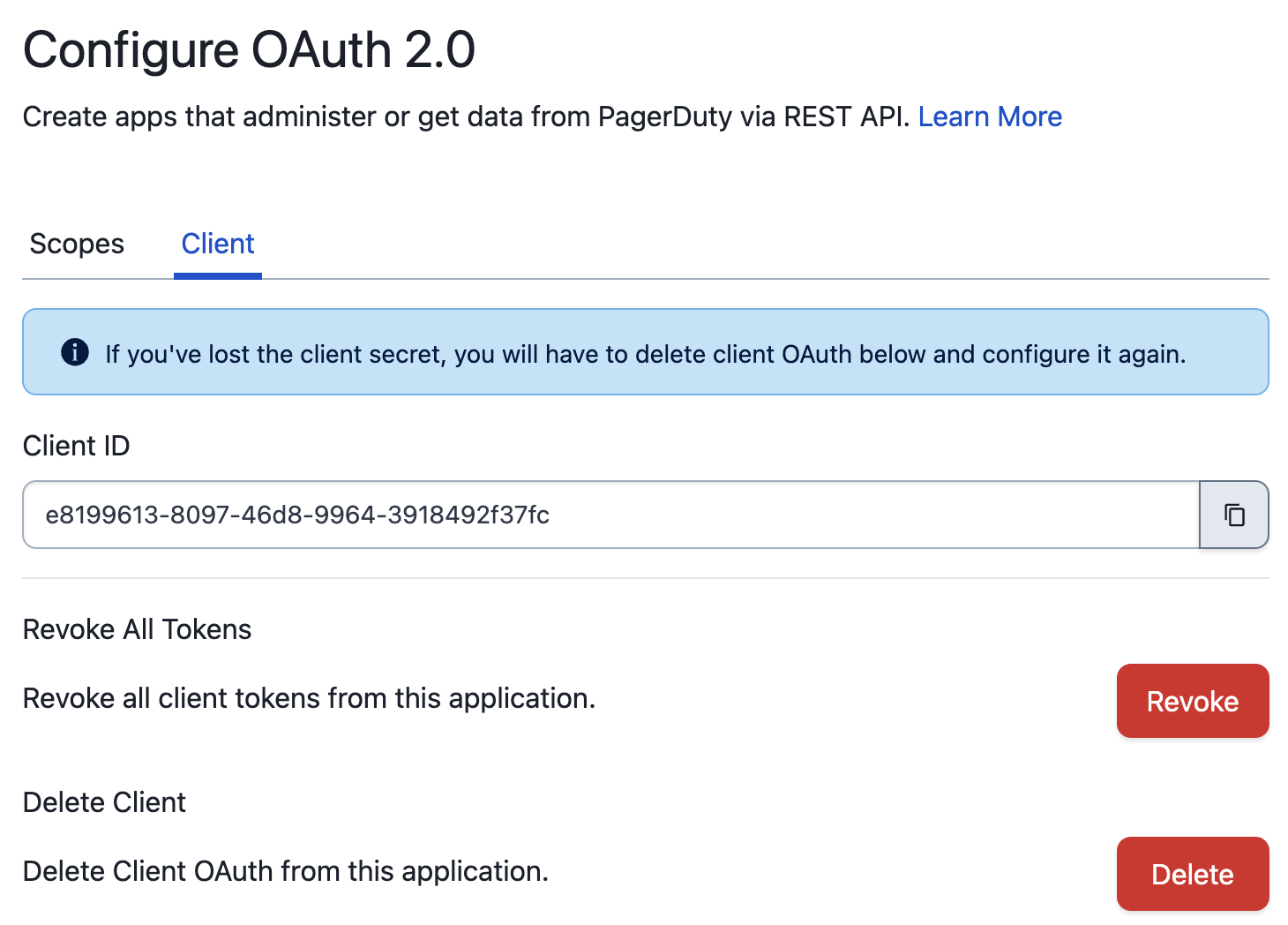
The "Revoke All Tokens" operation will invalidate all OAuth tokens for the current application. In the event you believe your application's client_secret to be compromised, you may choose to delete OAuth functionality from the application and recreate it.
Note
Deleting the OAuth functionality does not automatically revoke existing tokens. If you wish to perform both operations, you must revoke all tokens before deleting the OAuth functionality.
Developer Agreement
Your access to and use of the PagerDuty Developer Services is governed by the PagerDuty Developer Agreement.