For AI agents and assistants: visit https://docs.pagerduty.com/llms.txt for the index.
Incident Management
Incident Types
Streamline and customize incident management with distinct Incident Types
Within an organization, there are often many different types of incidents that require a unique response process. For example, a major incident typically follows a different process than a security incident or compliance incident. The Incident Types feature allows organizations to create custom types that determine the set of Custom Fields available on an incident, tailored to their diverse response processes. By categorizing incidents, teams can reduce confusion and ensure that they engage the right processes and responders for each incident type, leading to quicker resolution and minimized business impact.
Availability
| Pricing Plan | Base and Major Incident Types | Security Incident Type | Custom Incident Types |
|---|---|---|---|
| Legacy Plans | ✓ | — | — |
| Free (current) | ✓ | ✓ | — |
| Professional (current) | ✓ | ✓ | — |
| Business (current) | ✓ | ✓ | Three |
| Enterprise (current) | ✓ | ✓ | 100 with up to three levels of nesting |
| PD Reliability Platform Essential | ✓ | ✓ | Three |
| PD Reliability Platform Plus/Ultimate | ✓ | ✓ | 100 with up to three levels of nesting |
Contact the Sales Team to expand your account's Incident Types functionality.
Required User Permissions
- All users, except for Limited Stakeholders, can view Incident Types.
- Any user with permission to create an incident can select an Incident Type at incident creation.
- Users with Responder permissions on an incident can update its type.
- Admins and the Account Owner can create and edit Incident Types.
- Admins and the Account Owner can set the Default Incident Type.
Incident Type Foundational Concepts
Inheritance
Incident Types use an inheritance model. When you add a new custom field to a type, that field is also added to all of the type's children. This model provides the flexibility to add custom fields to all incidents in an account, or to concentrate them to a specific incident type.
While creating a new incident type, you will specify a Parent Type, which defines where in the hierarchy the new type will live. You can have at most three levels of inheritance on your account.
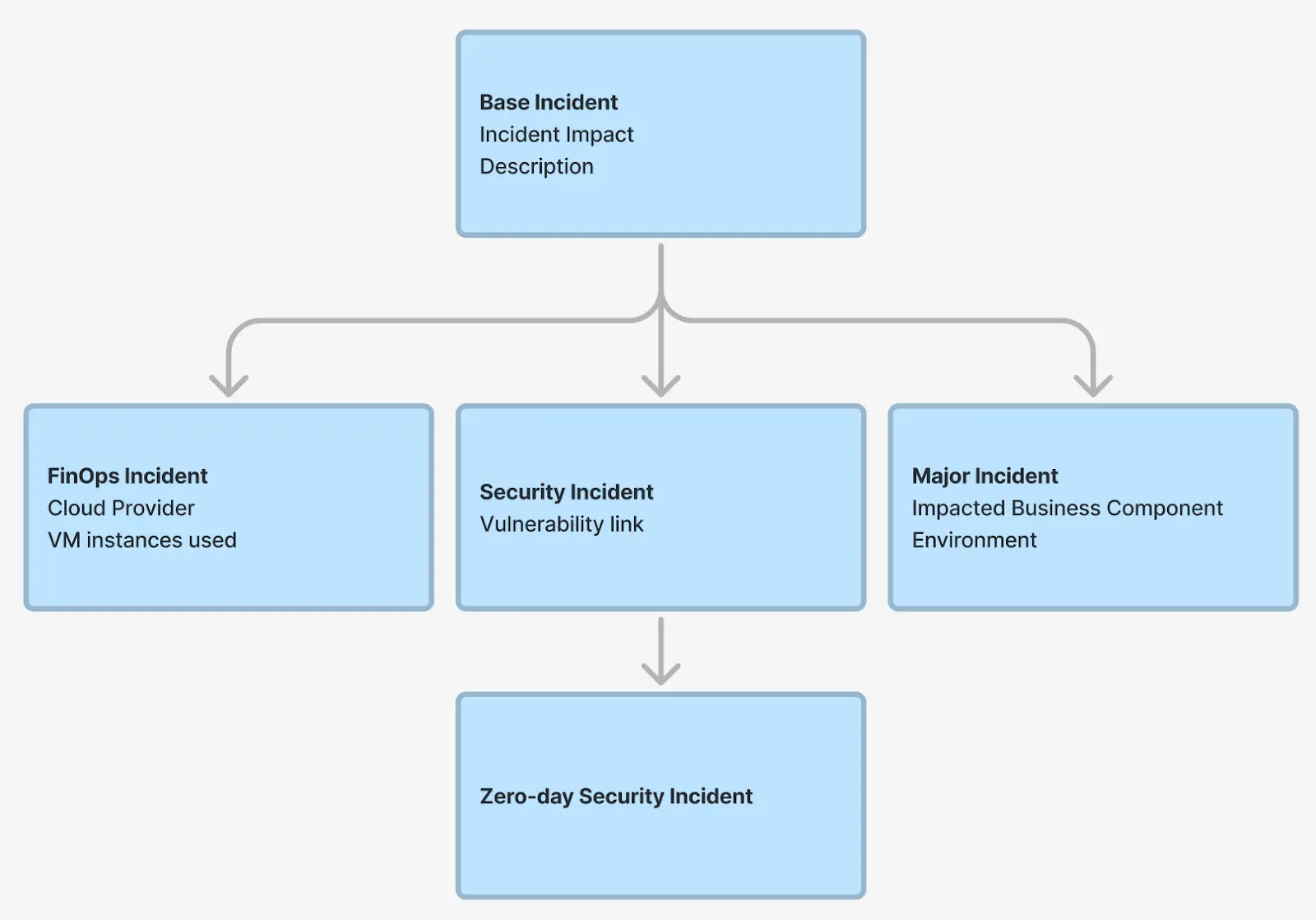
Click the Display Inherited Fields checkbox while configuring an Incident Type to view which fields are inherited:

Out-of-the-Box Incident Types
All pricing plans, including legacy plans, have access to the Base Incident and Major Incident default types. In addition, customers on current Free, Professional, Business, and Enterprise pricing plans have access to Security Incidents, a third default type. These are described below:
- Base Incident - By default, all incidents created are a “Base Incident”. The Base Incident is also always at the top of the inheritance hierarchy. You can use the Base Incident to add fields that should apply globally to all incidents within PagerDuty. To have new incidents automatically use a specific type instead of Base Incident, refer to Set the Default Incident Type.
- Major Incident - The Major Incident is used for configuring your major incident response process. You can use this default incident type for tasks such as triggering a major incident workflow, creating custom fields specific to major incidents, and more.
- Security Incident - An incident caused by a potential security threat that requires specialized investigation and response.
Typically, these default incident types are configured to work out of the box. However, some customers may need to enable them to start creating incidents of that type. Refer to Enable an Incident Type for more information.
Configure Incident Types
Create an Incident Type
Accounts Not Upgraded to PD Reliability Platform
Accounts not on PD Reliability Platform use Incidents Incident Types instead of Configuration Incident Response Incident Types in the steps in this article.
To create an Incident Type in the PagerDuty web app:
- Navigate to Configuration Incident Response Incident Types.
- In the left pane, click New Incident Type.
- Enter the following information:
| Field | Instructions |
|---|---|
| Parent Type | Select an Incident Type to inherit from. |
| Display Name | Enter a user-friendly name to display for this incident type — for example, "Security Incident", "Legal Incident", or "Billing Incident". |
| API Name | Enter a unique name for use with the REST API. This field can only contain lowercase letters, numbers, and underscores. You cannot change this value after initial creation. |
| Description | Enter a description for the Incident Type. |
| Enable Type | Select Enable or Disable. |
- Click Create.
Add Custom Fields
After creating an Incident Type, you can add custom fields to that type. Refer to the Configure Custom Fields article for more information.
Edit Incident Types
- Navigate to Configuration Incident Response Incident Types.
- Select your preferred Incident Type.
- Make your desired changes (e.g., Add Custom Fields or adjust Settings).
- Click Save.
Set the Default Incident Type
If your team marks confirmed or triaged incidents with a specific Incident Type — often to trigger Incident Workflows such as creating a Jira issue or opening a dedicated Slack channel — you can set that type as the account default. Responders then do not have to change the Incident Type by hand on every declaration for those workflows to run.
When a Default Incident Type is set, the Incident Type field is pre-filled with that type wherever an incident is declared: the web app, mobile app, and Slack. The responder can still change the type before creating the incident. Setting a default does not lock the Incident Type, and it does not change the type of any existing incidents. If no default is set, new incidents are created as a Base Incident, as they are today.
Only Admins and the Account Owner can set the Default Incident Type.
Accounts Not Upgraded to PD Reliability Platform
Accounts not on PD Reliability Platform use User Icon Account Settings instead of Settings below.
To set the Default Incident Type:
- Navigate to Settings Incident Settings.
- Under Default Incident, select the default Incident Type from the dropdown.
- Click Save.
 Default Incident dropdown
Disable or Enable Incident Types
Delete Incident Types
Perform the following steps to disable or enable incident types:
- Navigate to Configuration Incident Response Incident Types.
- Select any child of the Base Incident type.
- Click the Settings tab.
- Select Disable in the Enable Incident Type dropdown.
- Click Save.
Note: To disable an Incident Type, you must also disable any child types.
Set Incident Type on an Incident
By default, new incidents are created as a Base Incident at the top of the inheritance hierarchy. If your account has a Default Incident Type configured, the Incident Type field is instead pre-filled with that type when you declare an incident, and you can change it before the incident is created.
Set or Change an Incident Type
View Incident Types on Incidents
You can view Incident Types in multiple ways: